How to Create a Rythmo Band: Step-by-Step Method and Timing Tips
How to read and create a rythmo band online: a 6-step method to prep your video, fix the script, adjust the timings, and record your dub.
By BandeRythmo editorial team, practical content, reviewed by the product team
A rythmo band (also called a dubbing script or dubbing band) is a scrolling script synced to your video: the dialogue moves under the picture, timed to the original voice. The voice actor says each word as it crosses a vertical bar, which is what keeps the dub in sync with the image. This guide explains how to read one, then how to create your own online, step by step.
In short
- Time needed: 5 to 20 minutes for a short video.
- What you need: a computer or phone, headphones, and a microphone (your phone's mic is fine to start).
- Method: import the video, fix the script, adjust the timings, generate the band, record.
How to read a rythmo band
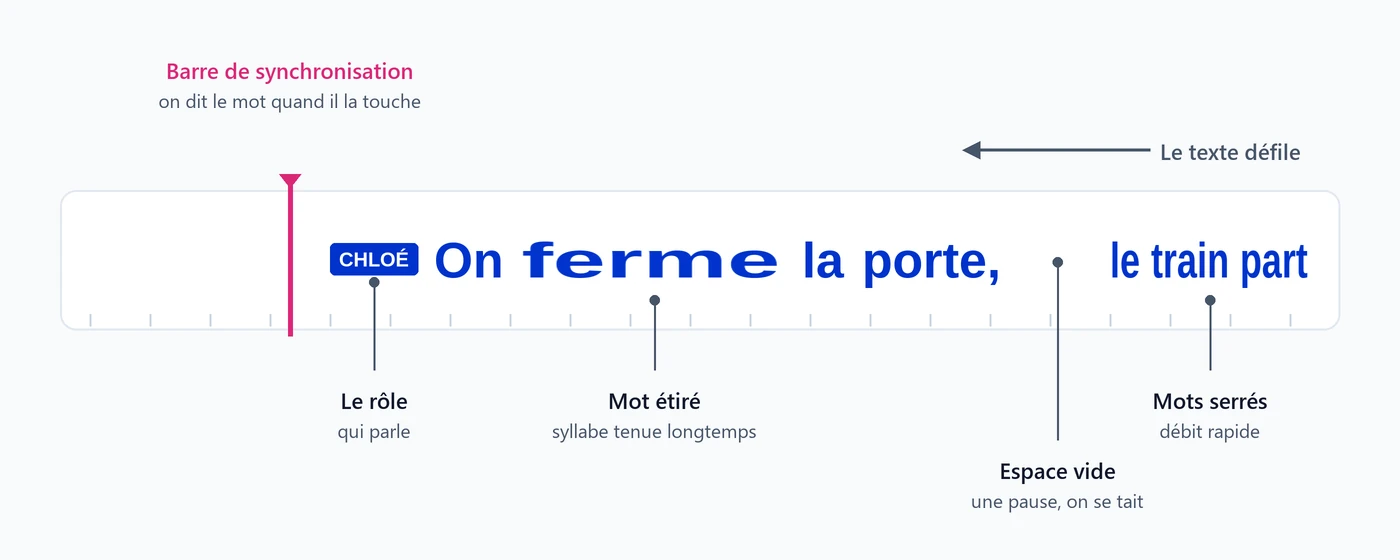
The text reads left to right, but the band scrolls to the left: each word travels toward the bar.
Four landmarks are all you need:
- The sync bar: a word is spoken the moment it touches the bar. Don't read ahead. Wait for the word to arrive.
- The role: the label before a line shows which character is speaking.
- Word width: a stretched word is spoken slowly or held for a long time, while tightly packed words are said fast.
- Empty gaps: these are silences. Stay quiet until the next word.
Other trade terms (spotting, loop, original and dubbed versions) are explained in the dubbing glossary.
Create a rythmo band in 6 steps
1. Choose your video
Pick a video you have the right to use: your own, one you received under a license, or royalty-free content. For a first try, a clip between 30 seconds and 2 minutes is ideal. The clearer the voices, the better the transcription: loud music, characters talking over each other, or distorted audio all take more cleanup.
Common formats are supported (MP4, MOV, AVI, MKV, WebM).
2. Run the automatic transcription
Upload the video to the online rythmo band editor. The dialogue is transcribed automatically in a few minutes, with the exact timing of every word and a split by character (A, B, C...).
This transcription is a first draft. It saves you most of the work, but you should always proofread it.
3. Fix the text and the roles
The script appears as cards, one per line. Proofread it while watching the video:
- Fix a word: double-click it (double-tap on a phone), type the correction, and confirm.
- Remove a filler: clear the word's field.
- Separate two characters: if one card holds words from two people, select the words in question and click "Extract". The new line goes to the neighboring speaker (or to a new speaker if there is only one). Change it from its label if needed.
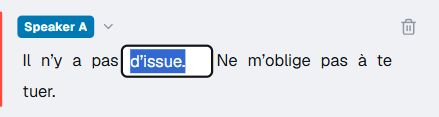
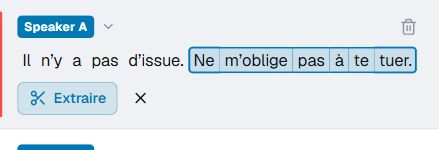
Selected words turn orange, then form a new line for the role you choose.
If you're adapting the text (translation, parody), this is also the time to rewrite the lines. Keep the length close to the original: a sentence that's too long will force you to speak too fast.
4. Adjust the timings on the band
The band shows when each word appears. Most of the time, the automatic timing is right. When a word comes too early or too late:
- click the word to select it, then drag it to shift it;
- drag its edges to lengthen or shorten it;
- draw a rectangle over an empty area to move several words at once;
- zoom with the mouse wheel for fine adjustments.

Start with the beginning and end of each line: those matter most to the ear. There's no need to tune every syllable on the first pass.
5. Generate the video with the band
Choose the format: the original one (16:9 for YouTube) or vertical 9:16 for TikTok, Reels, and Shorts. Generating produces a video with the rythmo band overlaid at the bottom of the frame. You can also export the text alone as an SRT file.

6. Record your dub
Put on headphones: without them, the video's sound plays back into the mic. Start playback, follow the bar, and record your voice right in the Studio, alone or with others using an invite link.
Do one take, listen back, fix one thing at a time (come in earlier, slow down a word), then go again. Two or three takes are usually enough.
Rythmo band and dubbing: who does what
The tool prepares the rythmo band: automatic transcription of the dialogue, timing marks, and the scrolling script under the video. The voice stays human: it is yours or your team's, and BandeRythmo generates no voice. The Studio is an option once the band is created, not a required step: you can also download the video with the band and record elsewhere.
Common mistakes
| Problem | Likely cause | Fix |
|---|---|---|
| You start the line late | You're reading the word instead of waiting for it to touch the bar | Watch the bar, not the text to its right |
| The sentence doesn't fit the time | Adapted text is longer than the original | Shorten the sentence instead of speaking faster |
| A word appears too early or too late | The transcription is imprecise in that passage | Drag the word on the band (step 4) |
| Two characters in the same line | Similar voices, or voices cutting each other off | Split the card with "Extract" (step 3) |
| You can hear the video in your recording | Sound playing through speakers | Use headphones |
What about doing it without software?
In dubbing studios, the rythmo band is traditionally a strip of 35 mm film, white or transparent. A specialist called a detector writes the original text on it in pencil, along with breaths, laughs, and sync marks, packing the writing tightly when the character speaks fast and stretching it out when they speak slowly. The adapted text is then written over those marks, and the band scrolls under the picture in the studio during recording.
This precision work is a profession in its own right. For a personal project, a social video, or a workshop, an online tool does the same job in a few minutes. To choose the right one for your project, see our comparison of rythmo band software. To adapt your lines, the online tools help (speech rate, timecode, subtitles), and our offers are detailed in BandeRythmo pricing.
Frequently asked questions
Do I need to install software? No. BandeRythmo runs in a recent browser, on a computer or a phone.
Is there a free trial? Yes. Import, transcription, and script editing are available without an account, up to 3 transcriptions per day. With an account, the free trial generates your first video in 720p with a watermark. To export it in 1080p without a watermark, unlock it with credits (credit packs from €1.99) or switch to the Unlimited subscription (€9.99 per month or €99.99 per year).
How is it different from subtitles? Subtitles appear in blocks for the viewer to read. A rythmo band scrolls each word at the pace of the voice, for the voice actor to say at the right moment.
Can we dub as a group? Yes. Collaborative mode lets you invite others with a link: everyone picks a role and records their own voice. To plan a session, read our guide to hosting a group dubbing night.
Who does the dubbing, the tool or me? You do. Automatic transcription prepares the text and timings of the band, while the dubbing stays human, with your voice or your team's.
How do I stay in sync with the video while dubbing? Follow the sync bar: a word is spoken when it touches it. Adjust the start and end of each line first, then do a test take with headphones and fix one thing at a time.
Sources and fact-checking
Related articles
Ready to prepare your rythmo band?
Upload a video you're allowed to use, check the transcript, and record a first take.
Open the app